amazon product image white background
Make Amazon Product Images Pure White Instantly
Amazon listings convert when the product is the only thing shoppers see. Background2White helps you replace busy scenes with a clean white canvas so your main image meets Amazon standards and looks consistent across your catalog. Upload your product photo, remove the background, and export a bright, marketplace-ready image without the Photoshop time sink.
How it works
Background2White is built for speed and consistency. Upload a photo, let the background removal run, then export a clean white result that is ready for marketplaces, ads, or catalogs. You can repeat the same steps for every image so your catalog stays consistent and your workflow remains simple.
Quality checklist
A clean background is only part of the job. Check edge quality, preserve natural shadows, and confirm that the background is uniformly white. This quick checklist helps you keep the final image consistent across every product photo and listing.
- Edges are crisp with no halos or jagged lines.
- Background is uniform white without gray tones.
- Shadows are soft and close to the subject.
- Resolution is high enough for zoom and detail.
Amazon White Background Requirements (2026)
Amazon still expects the main image background to be pure white so products stand out in search results. The safest target is RGB 255,255,255, with the product filling most of the frame and no distracting props. If your photo looks slightly gray or cream, it can read as unprofessional and may be rejected in stricter categories. This tool applies a true white backdrop while preserving accurate product color and edge detail.
- Target pure white (RGB 255,255,255) for main images
- Keep the product centered with ample negative space
- Avoid props, text, or borders that break compliance
Common Rejection Reasons & Fixes
Sellers often get flagged for muddy backgrounds, halos around the product, or visible shadows that look like the item was pasted on. These issues come from uneven lighting or imperfect cutouts. Background2White uses precise edge detection and gives you a clean white fill so you can avoid soft gray walls, cluttered rooms, or wrinkled backdrops.
- Remove gray cast and color spill in one pass
- Tighten edges around handles, straps, and contours
- Keep soft, realistic shadows instead of hard cutouts
Step-by-step: Upload -> Remove -> Export
The workflow is short: upload a JPEG, PNG, or WebP, choose a white background, and export the result. You can preview before and after instantly, then download the finished file for Seller Central. If you need multiple shots for a single SKU, repeat the process with consistent settings so your catalog grid looks uniform.
- Upload from desktop or drag and drop
- Choose solid white and confirm edge preview
- Export in PNG for fidelity or JPG for smaller size
Before/After Examples
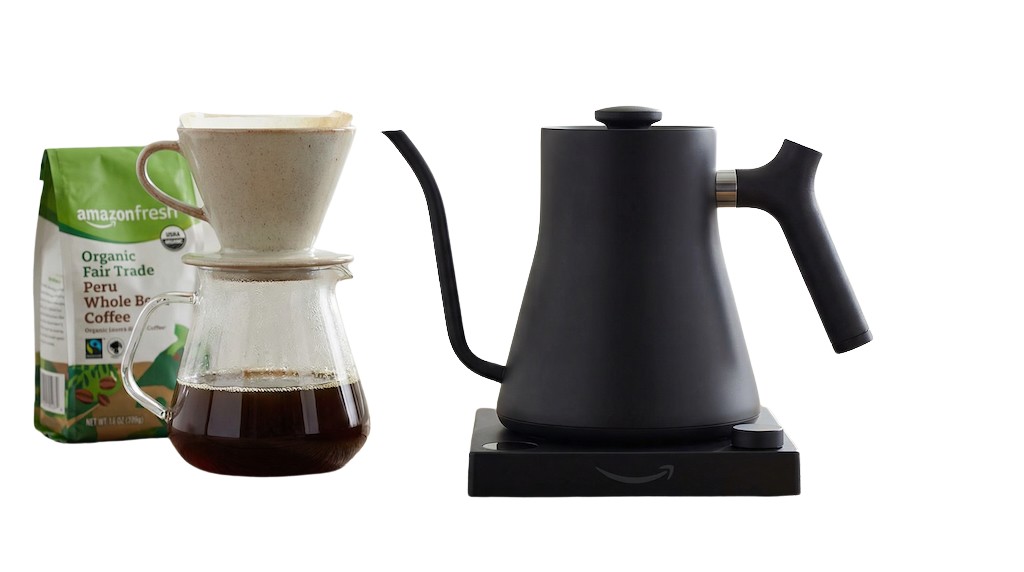
A great Amazon image shows the product clearly against a bright white background with no distractions. The before image might include a countertop, textured wall, or paper backdrop. The after image looks like a studio shot: crisp edges, balanced contrast, and a clean white field that highlights the item without overpowering it.
- Before: busy background and uneven lighting
- After: uniform white with clean outlines
- Result: a more professional listing image

Faster Than Photoshop for Listings
Manual background removal with Photoshop can take several minutes per image, especially for complex edges. Background2White is built for speed, giving you a clean white version in seconds. That means you can refresh multiple listings in one session, or launch a new product faster with fewer tools in your workflow.
- Skip manual pen tool tracing
- Consistent output without layer juggling
- Scale from a few photos to full catalogs
Tips for Perfect Edges & Shadows
Photograph on a simple background when possible, and avoid heavy backlighting that creates glowing edges. If your item has reflective surfaces, keep the product well lit from the front so the edge contrast stays strong. A subtle natural shadow adds realism, but make sure it stays soft and close to the object rather than floating away.
- Use soft, even lighting for easier edge detection
- Keep shadows subtle and close to the product
- Inspect corners and curves before exporting
Pricing and volume
Whether you are editing a handful of listings or a full catalog, choose a plan that matches your volume. You can start free to test quality and upgrade when you need higher-resolution exports or faster throughput.
Related links
Keep going with related resources and the main background removal tool.
FAQs
Does this meet Amazon's pure white requirement (RGB 255,255,255)?
Yes. The white background option is designed to output a true white fill so your main image meets Amazon's pure white expectation. You can verify the final file with a color picker if you want extra assurance.
What image size and format should I upload?
Upload your highest-quality original, ideally at least 1600 pixels on the longest side for zoom. JPG and PNG both work. Use PNG for the cleanest edges and JPG for smaller files if you are optimizing storage.
Can I process multiple product photos?
Yes. Run as many images as you need, one after another, and keep the same settings so your listing gallery looks consistent. For large batches, start with the highest-priority SKUs first.